Ambient Light
This note is based on DISCOVER three.js, mostly excerpts with some personal understanding
Basic Introduction
In the real world, countless light rays reflect and bounce off all object surfaces in a scene countless times, with color gradually fading and changing with each reflection or bounce, until they finally reach our eyes or camera. This creates the beautiful and subtle light and shadow patterns we see in the world around us every day.
Unfortunately for us, computers cannot simulate infinity. A technique called ray tracing can be used to simulate several thousand light rays, each bouncing several times in a scene. However, rendering frames in real-time using this technique requires too much processing power, so ray tracing and related techniques like path tracing are better suited for creating pre-rendered images or animations.
Creating high-quality lighting with three.js is about choosing combinations of these techniques to create a complete lighting setup. In three.js, light classes are divided into two categories to match two types of lighting:
- Direct lighting, simulating direct illumination.
- Ambient light, an inexpensive and believable way of indirect illumination.
Image-Based Lighting
Image-based lighting is the name for a series of techniques involving pre-calculating lighting information and storing it in textures. The most important IBL technique is environment mapping (also called reflection mapping), which is the value you just set for MeshBasicMaterial.envMap.
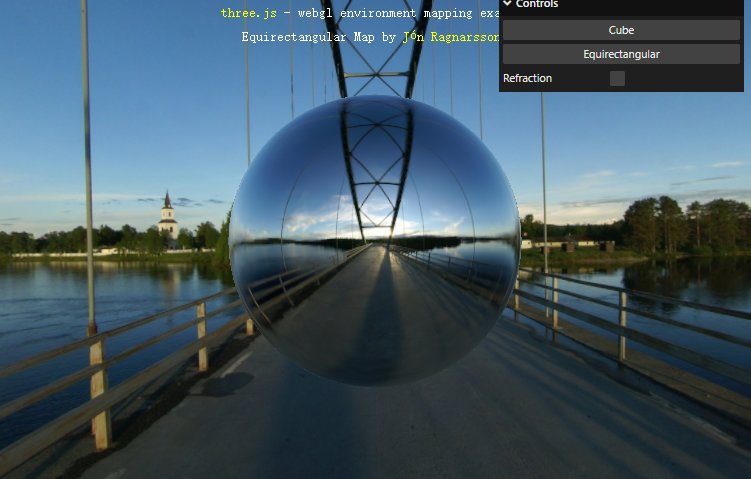
Image-Based Lighting (IBL): Scene background reflected on a sphere
Environment maps are typically generated using specialized photography techniques or external 3D rendering programs. There are several formats for storing the resulting images, two of which are demonstrated in the scene above: cube maps and equirectangular maps. Click the options in the menu to see an example of each.
Ambient Lighting
Ambient lighting is a way to fake indirect illumination that's both fast and easy to set up while still providing reasonable results. There are two ambient light classes available in the three.js core:
AmbientLightadds a constant amount of light to every object from all directions.HemisphereLightgradients between sky color and ground color, useful for simulating many common lighting scenarios.
Like direct lights, ambient lights also inherit from the base class Light, so they have .color and .intensity properties. Light, in turn, inherits from Object3D, so all lights also have .position, .rotation, and .scale properties. However, rotating or scaling lights has no effect. Changing the position of AmbientLight also has no effect.
Ambient light affects all objects in the scene. Therefore, there's no need to add multiple ambient lights to a scene. Unlike direct lights (except RectAreaLight), ambient lights cannot cast shadows.
light.js
import {
  AmbientLight,
  DirectionalLight,
  HemisphereLight,
} from 'three';

function createLights() {
  // const ambientLight = new AmbientLight('white', 2);

  const ambientLight = new HemisphereLight(
    'white', // bright sky color
    'darkslategrey', // dim ground color
    5, // intensity
  );

  const mainLight = new DirectionalLight('white', 5);
  mainLight.position.set(10, 10, 10);

  return { ambientLight, mainLight };
}

export { createLights };AmbientLightis the cheapest way to fake indirect illumination in three.js. This type of light adds a constant amount of lighting to every object in the scene from all directions. It doesn't matter where this light is placed, nor where other objects are placed relative to the light.
World.js
import { createCamera } from './components/camera.js';
import { createCube } from './components/cube.js';
import { createLights } from './components/lights.js';
import { createScene } from './components/scene.js';

import { createControls } from './systems/controls.js';
import { createRenderer } from './systems/renderer.js';
import { Resizer } from './systems/Resizer.js';
import { Loop } from './systems/Loop.js';

let camera;
let renderer;
let scene;
let loop;

class World {
  constructor(container) {
    camera = createCamera();
    renderer = createRenderer();
    scene = createScene();
    loop = new Loop(camera, scene, renderer);
    container.append(renderer.domElement);

    const controls = createControls(camera, renderer.domElement);

    const cube = createCube();
    const { ambientLight, mainLight } = createLights();

    loop.updatables.push(controls);
    scene.add(ambientLight, mainLight, cube);

    const resizer = new Resizer(container, camera, renderer);
  }

  render() {
    // draw a single frame
    renderer.render(scene, camera);
  }

  start() {
    loop.start();
  }

  stop() {
    loop.stop();
  }
}

export { World };
HemisphereLight
The lighting on the back of the cube looks quite dim. To make scenes lit with AmbientLight and DirectionalLight look good, we need to add multiple directional lights with different directions and intensities. For setups using multiple direct lights, this encounters many of the same problems we described above. As we'll see later, HemisphereLight gives better results here with almost no additional performance cost.
This doesn't mean AmbientLight is useless. For example, HemisphereLight isn't suitable for all scenes, in which case you can fall back to AmbientLight. Additionally, this type of lighting is the cheapest way to add overall brightness or a slight tint to a scene. You'll sometimes find it useful for modulating other types of lighting (like environment maps) or adjusting shadow darkness.
AmbientLightdoesn't show depth- Light from
HemisphereLightgradients between the sky color at the top of the scene and the ground color at the bottom of the scene.
We can adjust the gradient between sky and ground by changing the light's .position. Like all light types, .rotation and .scale have no effect. The HemisphereLight constructor takes the same .color and .intensity parameters as all other lights, but has an additional .groundColor parameter. Typically, we'll use a bright sky .color and a darker ground .groundColor:
const ambientLight = new HemisphereLight(
  'white', // bright sky color
  'darkslategrey', // dim ground color
  5, // intensity
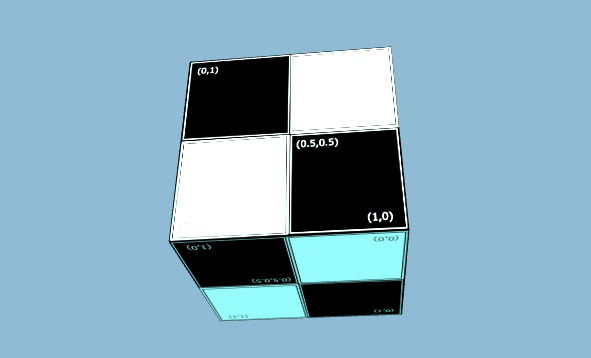
);
However, because HemisphereLight doesn't shine from any particular direction, there are no shiny highlights (aka specular highlights) in this scene. This is why we typically pair this type of light with at least one direct light.